Welcome to part 8 of our series of tutorials on building a website with MODx CMS. So far we’ve looked at:
Part 1: Introduction to MODx
Part 2: Installing MODx
Part 3: Working with Templates
Part 4: Introducing Chunks
Part 5: Introducing Snippets
Part 6: Introducing Template Variables
Part 7: Introducing Ditto
As we work through these tutorials, we’re building a MODx resource site called Learn MODx. In the last installation we introduced Ditto and continued working on the Library section of our resource website. In today’s installation we’re going to continue working some more with Ditto, and learn how to template our output so that our Library page has the look we want. In the learn we will learn a little more about Ditto, its parameters, and its placeholders.
Before we proceed, I need to mention a couple of things. In the comments to Part 7 – Introducing Ditto, fellow MODx’ers Kongondo and Zaigham both pointed out that I was using deprecated parameters in my Ditto call… old habits :). Thank you much for pointing that out guys. In the current install, we’re using version 2.1 of the Ditto snippet. As Kongondo pointed out, the &startId parameter has been deprecated in this version of Ditto. The parameter still works, but we are going to use the supported parameter for our current version of Ditto, which is &parents.
Therefore, before we proceed any further, let’s open up our Library page and alter our Ditto call:
[!Ditto? &startID=`6` !]
to
[!Ditto? &parents=`6` !]
The lesson here is that I should heed my own advice and always read the documentation for the snippet we’re using to make sure that we’re using the correct up-to-date parameters and such 🙂
The Ditto home page gives us all the parameters and placeholders for the current version of Ditto: http://ditto.modxcms.com/files/snippet-ditto-php.html
Alright, so with that out of the way, we’re now going to move on with our Library page. If you recall from the last tutorial, the end result of our Ditto statement was that our Library page looked like this: (click on image for larger view)
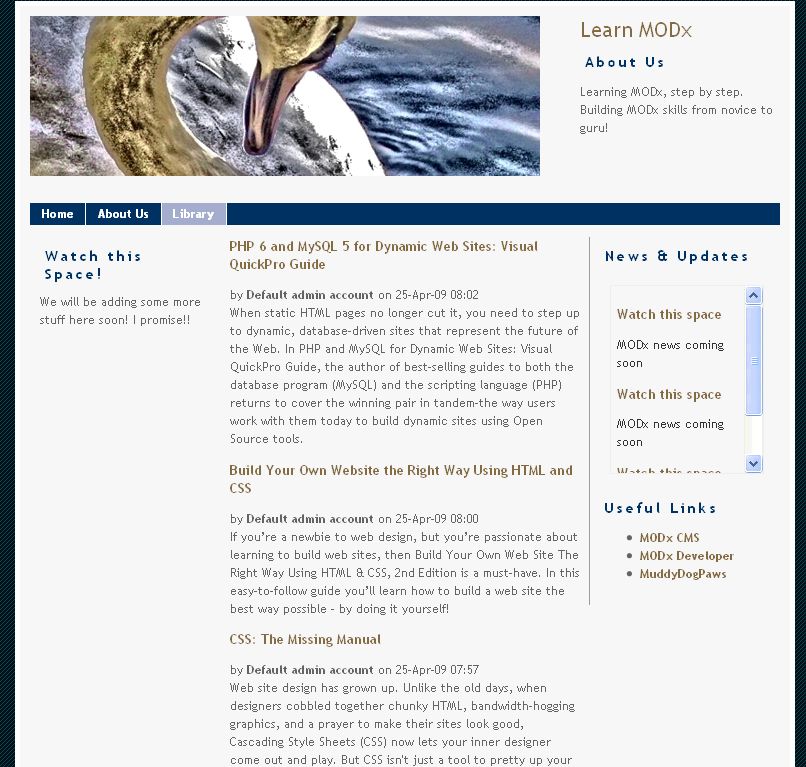
I want the individual entries on that page to look a little different. I would like to remove the user name as well as the date, and only have the title and the content, as well as a read more link that the visitor can click on and go to the page with the full content.
Create a Custom Template
The first step is to create a chunk with a template that will determine what our Ditto output looks like. I will then call this template into the Ditto call.
Go to Administer -> Resources -> Manage Resources and create a new chunk. We’re going to call this chunk librarytemplate.
The template that we create will, like all other templates, be simple HTML. However, we need to add placeholders for the different parts of our content, such as the title, the summary, and the read more link.
The syntax for placeholders is [+placeholder+]. Several placeholders are supported by Ditto. You can find a full list of Ditto placeholders in the Wiki. Note however that this list is for version 1.0 of Ditto, and not all of them may be supported in version 2. I have not been able to find a current complete list of Ditto 2.0 placeholders. If one exists, please let me know in the comments and I will add it.
OK, so for our custom template to simply have a hyperlinked title, the summary, and a read more link, we simply put the following code in our librarytemplate chunk.
<h3><a href="[~[+id+]~]">[+pagetitle+]</a></h3>
[+introtext+]
<a href="[+url+]"> read more...</a>
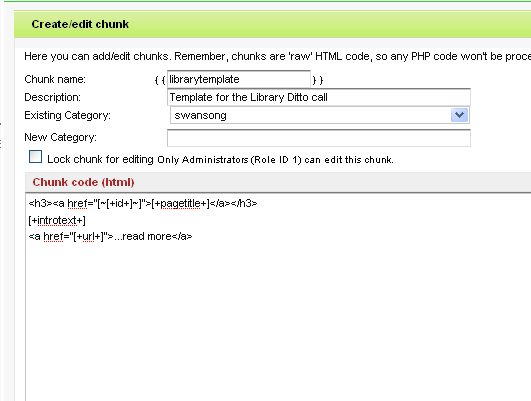
What this basically means is that our title will be a <h3> level title and will link back to the main page. You can see the syntax is simply the same as for creating a regular link, except that we’re using placeholders.
[+introtext+] will place the summary text, and the final <a href…. call will place the read more link. In that last line I could have used [~[+ID+]~] and it would still have worked, but using [+url+] is cleaner and separates the meaning of the two links.
Alright, save the chunk.
Ditto Output with a Custom Template
We will now go into our Ditto call and tell it to use this template that we’ve created to theme the output of our Library page. We do this by using the tpl parameter.
So in the Library page, alter your Ditto call to include the template parameter and call your new template chunk.
[!Ditto? &parents=`6` &tpl=`librarytemplate`!]
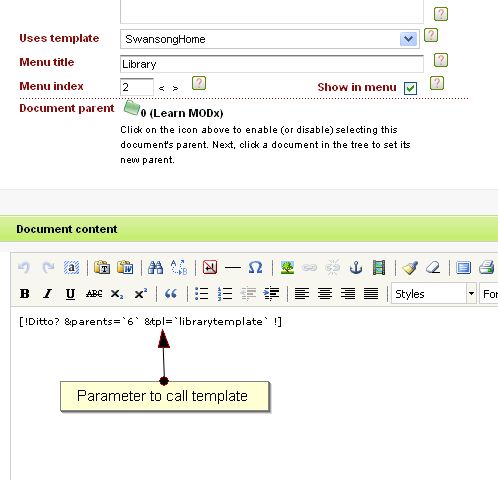
If we save the page and now look at our Library page, you see that the author and date no longer show, and we now have a “read more” link at the end of each entry.
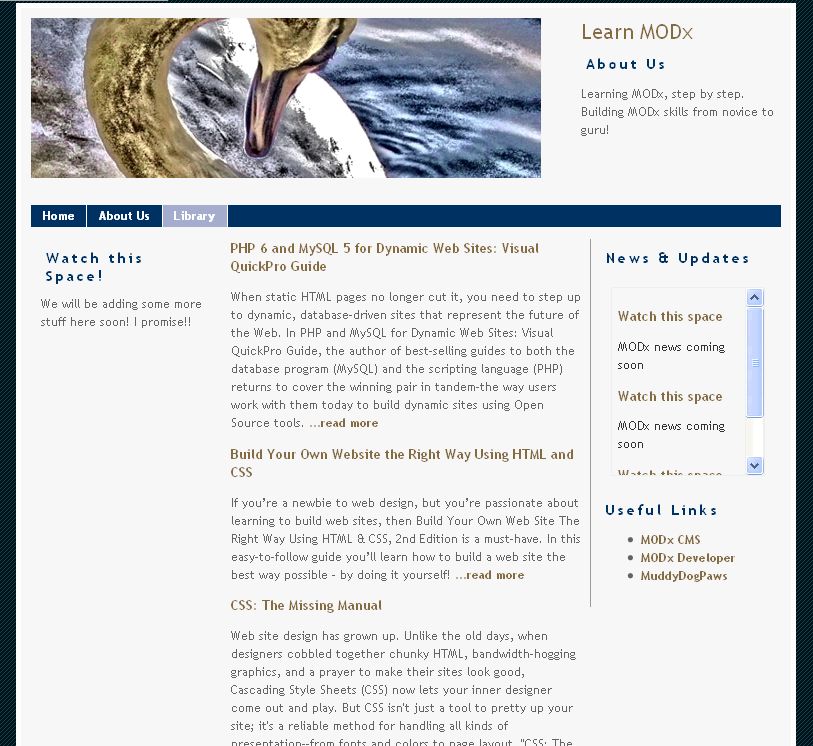
Looking good :).
Now I definitely haven’t exhausted the list of books I want to share that are useful for MODx’ers. Many skills will come together to make you better at building your MODx websites, HTML/CSS skills, PHP skills, design skills, and who know how many other MODx books are going to be published. This list is definitely going to grow! And if I leave my Library page as it is now, it’s going to grow longer and longer, and you’ll have to scroll and scroll and scroll… and eventually it won’t even load 😮 .
I need to tell the Ditto call to only list x number of entries per page. For now, because I only have 5 entries, I am going to ask it to list only 2, for purposes of demonstration.
To do this, we use the Ditto parameter display, so our Ditto call looks like this:
[!Ditto? &parents=`6` &tpl=`librarytemplate` &display=`2` !]
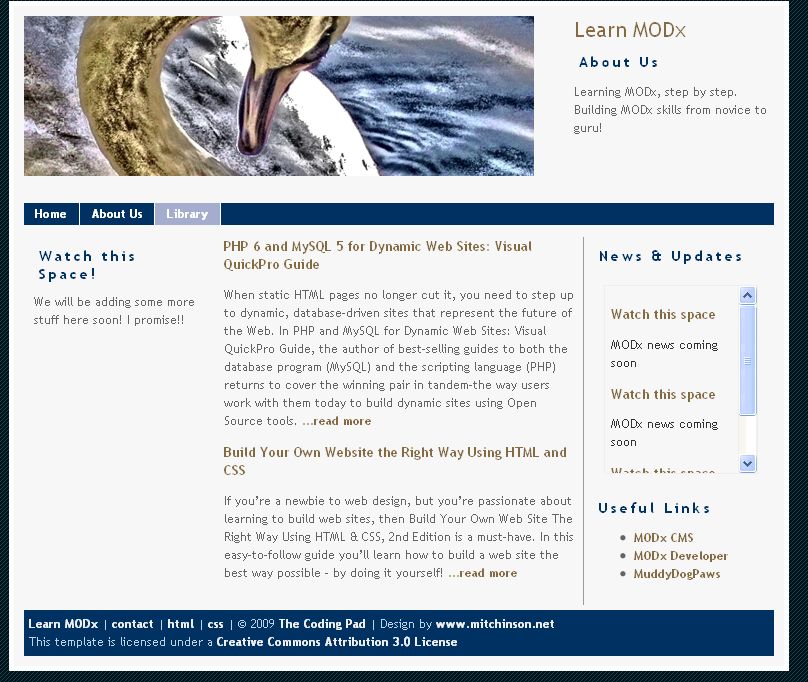
This will display only two entries on the Library page:
Pagination
Now what you’ll realize immediately is that Ditto doesn’t automatically paginate or give you a way to navigate to the next page of books. You have to add more parameters and placeholders to create this navigation. You can read more on paginating at the Ditto page (http://ditto.modxcms.com/tutorials/pagination.html).
I will add two parameters to my Ditto call:
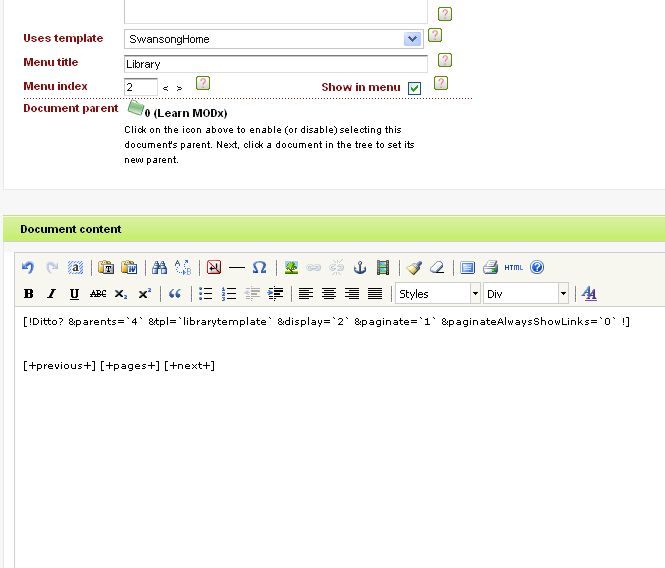
[!Ditto? &parents=`6` &tpl=`librarytemplate` &display=`2` &paginate=`1` &paginateAlwaysShowLinks=`0` !]
- Setting the paginate parameter to 1 turns pagination on (zero turns it off).
- Setting the paginateAlwaysShowLinks to zero leaves the “Next” or “Previous” (or whatever navigation text you’re using) placeholders empty when the current page is the last (or first) page of results.
The last thing I need to do to complete my pagination is to add some placeholders below the Ditto call to display my navigation. I will simply add
[+previous+] [+pages+] [+next+]
below my Ditto call. I can also place this in <div> tags so that I can style it as per the instructions on the Ditto pagination page.
So my Library page content area looks like this:
We can now save the Library page and look at the results.
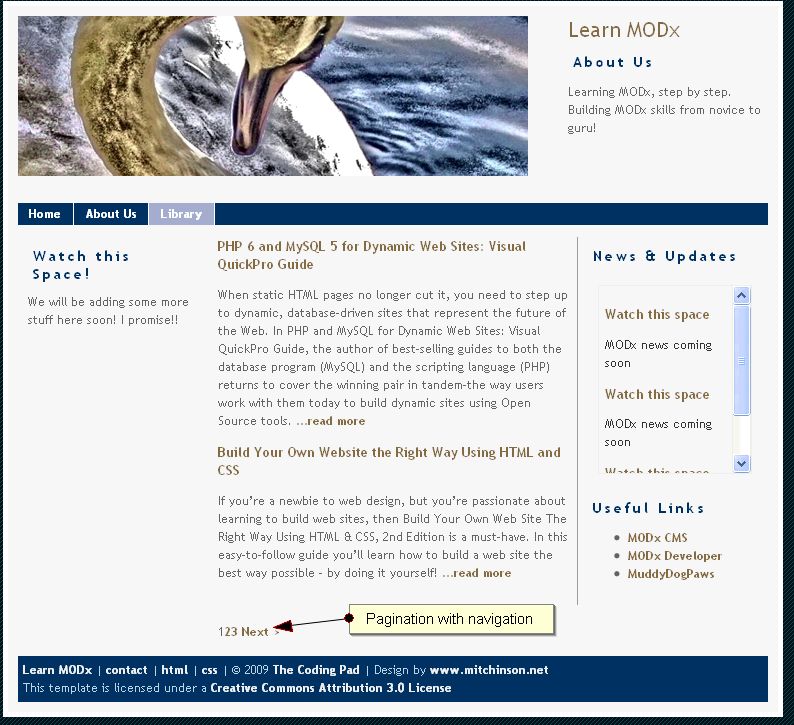
We now have page numbers at the bottom and a navigation that lets us move through pages in our Library. It may not look too hot 🙂 , but it works, and adding hotness can be achieved by styling. You can follow the instructions on the Ditto Pagination webpage to style your navigation.
There are so many things you can do with Ditto, I could not possibly cover them all, I don’t even know them all 😮 , but I hope that these tutorials give you a starting point to learn the basics and explore more on your own using the documentation at the MODx website, asking questions at the MODx forums, and experimenting with your websites.
For now, we’re going to leave Ditto alone, and move on to other things in the next tutorial, adding more functionality and goodies to our MODx resource site as we continue to learn more MODx basics! So stay tuned 🙂
As always, I welcome any comments, corrections, and hellos! 🙂
And do remember to grab your copy of the MODx Web Development book!
More Reading:
http://ditto.modxcms.com/ – Ditto Official Site and Documentation
http://ditto.modxcms.com/tutorials/creating-a-custom-template.html – More on creating custom Ditto templates
http://wiki.modxcms.com/index.php/Ditto_Placeholders – List of Ditto placeholders, be aware that this list is for an older version of Ditto and they may not all be supported in the current version.
http://www.pogwatch.com/ditto/ditto-parameters.html?tab=ph – Complete list of Ditto 2.1 placeholders
http://www.pogwatch.com/ditto.html – Lots of Ditto information
Job well done as a beginner i can understand it very well awaiting to see the next tutorial
Mary,
These are excellent — I can’t wait for more tutorials. You do a great job of explaining complicated concepts.
Any chance you will cover a member login page or creating a search page? These are two items I have struggled with.
Thanks again for the tutorials!
Ian
Thanks again for the feedback. Yes, I do plan to cover these topics and more, just need to make the time! 🙂
mary
Mary, these tutorials are brilliant. This is the first time I’ve used a CMS from a designer/webmaster’s perspective and I haven’t been lost once throughout your tutorial.
Two thumbs up – I’m learning so much from your tuts and from the comments people have been leaving.
Thanks.
Kahli
Thank you so much for your feedback. I’m glad that you’re finding the tutorials useful! This beginner series has been fun for me to write and I’m really excited that it’s helping people get into MODx.
Hope to have the next posts up soon. Let me know if you have any questions, and I hope you keep following the series! 🙂
mary
This tutorial is really brilliant. I can’t belive how powerfull MODX is. I have lost so much time with Joomla.
Keep them coming.
Xerxes
Thanks for the feedback!! 🙂 MODx is pretty powerful, and if you know how to do some PHP coding, you can go a long way with it.
mary
I’m having problems with Ditto.
Instead of using this code :
[!Ditto? &parents=`6` &tpl=`librarytemplate` &display=`2` &paginate=`1` &paginateAlwaysShowLinks=`0` !]
I tried to use something more generic so I can just copy it everytime I create a new library. I took a look in Modx wiki for some placholders and itseems that [+id+] is supposed to return the id of the document so I went ahead and replaced the number of my id by this place holder :
[!Ditto? &parents=`[+id+]` &tpl=`librarytemplate` &display=`2` &paginate=`1` &paginateAlwaysShowLinks=`0` !]
But when I try it I have my main menu listed on the page. It looks like it somehow returns the parent’s id.
Any idea what’s wrong???
Xerxes,
The &parents parameter tells the Ditto call which parent container holds the documents it needs to aggregate.
By default, if you don’t specify &parents, Ditto will use the document you’ve placed it in as the parent and will aggregate all the documents in that container. In my example in the post, I could completely exclude the &parents parameter and my Ditto call would still work because I have placed it in the document with an ID of 6.
So if I have understood you correctly, and you want to not have to change the value of &parents each time you use Ditto, you can exclude that parameter as long as you’re placing the call in the document that is the parent container.
Does that make sense?
Yesn, that makes sense but that didn’t explain why the palceholder didn’t work but another poster answered my question. I was mixing up the document variable and the palceholder.
Good to see a decent series of newbie tutorials! Unfortunately, ModX documentation is scattered across the Interweb so most enthusiasts learn by trial and error experimentation and a lot of googling.
The other problem with Xerxes’ example is that he’s using the placeholder in the snippet call. It should be
…. &parents=`[*id*]` …
i.e. use the document variable
Cheers
Thanks. that explains the problem.
I have another question for you guys.
Is there anyway we can link the tinyMCE styling to the CSS file that we use???
Let me clarify with an example.
For instance you define your h1 tag in your CSS file but when you open up your content page if you use the heading1 style it creates a new style and it doesn’t take in consideration the style you have already defined in your CSS file.
I don’t know if I’m making any sense here.lol
hi there,
i wonder if you have come across any tutorials on more advanced ditto stuff (besides the official documentation). I am trying to figure out a couple of things with tagging and there doesn’t seem to be a whole lot out there on it…
maybe you could help me,
i have two problems i am trying to figure out
1) I am using tagging (with template variables) to filter documents so I can list them on different summary pages based on the tv categories tag(s) selected for the document.
When I have only one tag selected for a document, the ditto call works fine, but if I have more than 1 tag selected for a document, it does not display the document in the ditto call at all.
Here’s the ditto call
[!Ditto? &parents=`6,16` &tpl=`releaselistitem` &summarize=`5` &total=`20` &paginate=`1` &alwaysshow=`1` &sortBy=`createdon` &sortDir=`DESC` &trunc=`1` &truncLen=`300` &commentsChunk=`` &displayArchive=`1` &paginateAlwaysShowLinks=`1` &extenders=`tagging` &descendentDepth=`1` &tagDelimiter=`,` &tagData=`tvcategoryoptions` &tagMode=`onlyTags` &tags=`[*longtitle*]`!]
where *longtitle* is the variable in the document that corresponds to the appropriate tag
As far as I understand it, the &tagMode=`onlyTags` should do this correctly, but it isn’t.
Also I am wondering if I can use multiple templates in one ditto call. Like if I have a ditto call that refers to multiple &parents, if I can have a different display for the items in each category.
Thanks!
KM,
thanks for your comment, I haven’t come across anything more advanced except what’s on the official Ditto page and the other links that I added to the post. I see you figured out the Ditto issue 🙂
I hope that as more experiment and learn with MODx they’ll document what they’re learning so that we have more tutorials out there. The MODx forums are also a great place to ask questions and learn.
hey nevermind about the first thing, I figured it out, I had to add the ‘delimited list’ widget to the TV so that the returned values are separated by a comma. Works great now!
Great job! I’m really enjoying learning MODx this way… such a nice treat after trying (in vain) to figure it all out on my own – thanks!!
Kris
Thanks for the feedback!! 🙂
I hate to complain, but the HTML for the Library page Content div is bad.
Specifically:
PHP 6 …
Since when is followed by legal?
The problem is that TinyMCE is used to edit the template. It makes the Ditto call a paragraph and there is no option to remove the pair.
The only fix is to turn off TinyMCE, delete the AND change th7e & codes to &
There has to be a better way!
Bob,
I suspect you had some code in your comment that didn’t get through. I don’t understand your question.
I generally turn off TinyMCE editor when working with snippets and such to avoid all the extra formatting.
mary
With “read more” the ellipsis follows the text not precedes it. Because it stands for the more which is after the “more”.
Love the MODx tutorials. You’re not allowed to stop discovering and writing. That is all. 🙂
pbear
You’re absolutely right about the ellipsis… doh 🙂
Thanks for the feedback. I have more tutorials in the pipeline, just a tad overwhelmed with school right now. But stay tuned, there are more coming!
mary
hi Mary. thanx 4 great utorials u put here. I read all 8 parts. thats very helpfull :). waiting for more.
i want a website with HTML files and a menu like this http://www.indianembassy-tehran.com/ (text and html links and transparent bg in menu)
could u help me plz? what i must do?
Naji
thanks for your feedback! Glad you’re finding the tutorials helpful! 🙂
For the menus on that page, I believe the key to the transparency is in the css 🙂 Depending on your skill level with HTML/CSS, this effect would be implemented in your template.
mary
thanx mary. and if i want html files like this site http://www.ininedesign.com/ what whould i do? i mean for seo
Naji
I recommend that you look at various HTML/CSS tutorials to get you up to speed with creating the kind of html pages you want. I *might* be doing some tuts along those lines soon, but for now I recommend NETTUTS, and if you want more advanced and detailed tuts, you can join the Net Plus program for great tutorials in this area. Also, just by searching google you will find many awesome tutorials. If you want I can prepare a list of the ones I recommend. What is your level of HTML knowledge – beginner, intermediate, experienced?
mary
FWIW, if one installs the plugin PHx then the behavior of Ditto changes as noted here :
http://www.pogwatch.com/ditto/ditto-pagination.html
I found this out the hard way when I followed this tutorial (which worked), then installed PHx as part of an effort to get another snippet to work, only to find that my pagination was goofy/nonexistent. Since I had also made a number of styling changes, I figured I had goofed things up there.
mconsidine
Thanks for the heads up on PHx and Ditto. And thanks also for the link to Pogwatch! Will add it to the list of MODx resources! 🙂
Ditto is cool and so are these tutorials. Thanks so much!
Darren
You’re welcome! 🙂 Yeah Ditto is pretty cool, I don’t even think I’ve scratched the surface of what you can do with it!
Re Ditto 2.1 placeholders, there’s now a full list of them on Pogwatch at http://www.pogwatch.com/ditto/ditto-parameters.html?tab=ph
I shall try to add this to the wiki real soon now
KP
Keith
thanks for the info. Link added to the reading more list at the end of the post.
Ditto is an amazing and powerful snippet 🙂
Excellent tutorial
i need to ask something how i can create detail page of post and how to add comments section ?
To add comments you need to use the Jot snippet.
Excellent tutorial…
I think I may have missed something though, because each of my “library list entries look like this:
MODx Web Development
2.This book will… 3. read more…
I don’t see where it’s picking up those numbers “2. and 3.”
Each of the books in my library has the same numbering.
Any thoughts
Malcolm.
Not sure where these numbers might be coming from. Are you developing on a live server that I can take a look at or locally on your computer?
Where exactly are the numbers appearing, within the text?
Can you paste your code here so we can take a look? It can be difficult to troubleshoot a problem without seeing the code 🙂
thanks
mary
Is there a Ditto vor version 1.0.0? I attempted to download the most recent version from the MODx site but it resulted in a 404 error. Would love to have this on my site!
Ditto 2.1 is the latest version for Evolution and should work fine with MODx Evolution 1.0.0
You can get it here:
http://modxcms.com/extras/package/96
Click on the Previous Releases tab, and then click on 2.1 to expand it.
Just got started with ModX, and I can’t find Ditto except the alpha version for revolution–is it still possible to get ditto for 0.9.6.3?
Stephen
I just went and did a search and couldn’t find it either. I have posted a question about it in the forum and hopefully will get an answer. Here’s the thread if you want to follow it:
http://modxcms.com/forums/index.php/topic,38027.0.html
In the meantime, have you checked your installation of MODx under Snippets to be sure you don’t already have Ditto? It comes prepackaged with the MODx installation and will be installed by default unless you check it off to not be installed.
mary
EDIT: Got an answer to this on the forums. Go to: http://modxcms.com/extras/package/96
Click on the Previous Releases tab, and then click on 2.1 to expand it.
Ah yes, there it is, thank-you!
No worries 🙂
My library page looks the same as yours, clicking the book title or “read more” brings you to the document content of the individual book, but the title and the picture of the bookcover is nowhere to be seen.
Did I miss something or should I just create a new template for this page, showing the title, the content and the picture ?
(you can go to the site by clicking my nick)
another question is about the order that the pages (the books) are presented. I noticed that the last book you add is presented the first on the page. This makes sens, but suppose I would like to change this ?
Thanks
Bob,
1. Regarding the book cover, did you add the template variable for the image and upload your book images? If you did then when you create each library entry you should have a field that allows you select what image to attach to the entry. Then you want to make sure that the code for the TV is added to your template. See Part 6 on template variables where I walk you through how to set this up – https://codingpad.maryspad.com/2009/04/20/building-a-website-with-modx-for-newbie-part-6-introducing-template-variables/
2. For the book title, I realize I left that out of the tutorial for some reason. But it’s actually trivial to add it in. In the SwansongBooks template (refer back to Part 6 of the series, right above the {{bookChunk}} call but still inside the content div, add [*pagetitle*] (I wrap mine in h2 tags). This will add the page title.
3. On your last question, there is an orderBy variable (see http://ditto.modxcms.com/files/snippet-ditto-php.html ) that you can use with Ditto, but I have honestly never used it so I don’t know how it works (at the moment) 🙁 However, if you go into the MODx forums and search for “ditto sorting” you will see a lot of discussions that will give you ideas on how to order your Ditto output.
Hope this helps, and thanks again for your questions!
mary
Mary, like others really enjoying this tutorial.
One question, is it be possible to include a thumbnail of the (template) books in the ditto results on the library page? Therefore creating an Amazon type results page.
Peter,
That would definitely be cool. I’m sure it’s possible to do that by modifying the template but I can’t think of it off the top of my mind… Another thing to add to my list of MODx things to figure out and share 🙂
Will definitely do posts answering these questions when I figure them out. Hopefully one of the MODx gurus who stop by here will have an answer for us 😉
Mary, thanks for your answers.
@1. Yes, I did add the TV and uploaded the images. Checked it and they are in my assets/images folder.
I tried to fix it and got the wellknown questionmark now, and clicking the questionamrk brings me to the Amzaon site, so I’m making progress. 😉
I will look into it later, I probably made a mistake somewhere down the road. It is not that important, the idea is clear.
@2. yes, offcourse, [*pagetitle*] , easy enough.
@3. I tried fiddling around with Ditto, which went wrong rather quickly, giving me errors when I open the page now.
Which brings me to the next question:
Where is the undo button ?
I am used to working in Dreamweaver, giving me the possibility to always go back when things go wrong. Also, Dropbox (where I save all my files) keeps versions, so I can go back even if I accidently saved or overwrite my files.
What would be the best way to handle this when working on a live site from within a browser window ?
Tried to put back the Ditto Snippet (as it was after the install but can’t find it ?
Thanks again
Bob
Bob
As far as I know there’s really no undo button when working with any part of MODx. What you should do is back your files up as you go, and your database too. MODx doesn’t really work like Dreamweaver or any other tools like that. I don’t use Dropbox either so not sure how that works.
What do you mean by “put back the Ditto Snippet? All you do is call it. The snippet itself should be unchanged, unless you opened and modified it. Does it show up under Resources in the Snippets section?
As for keeping versions to revert to, what you can do is create a local SVN- or CVS-like repository and after each session upload your current working version. Does that make sense?
mary
Sure, I already knew that there is no undo button 😉
But backing up the files and the database is not something that sounds very easy to me, especially since this whole database thing is new to me. Normally, when I working on HTML and CSS files this is a lot easier to manage.
About Dropbox, this is a file-syncing utility that automatically keeps revisions of your files whenever you save them. Nothing short of brilliant check it out here: (referral link) https://www.getdropbox.com/referrals/NTEyNzU4NTE5
As for the Ditto Snippet, yes I modified the snippet itself, trying to change the Order in which its presents its output. Without backing up the original. So, where could I find the original version of the snippet ?
Thank you
Bob,
You can find the original version of the Ditto snippet at the MODx repository. Go to http://modxcms.com/extras/package/96, click on the tab “Previous Releases” and you’ll find the version we used in the tutorial (2.1).
Regarding DropBox, I googled it after your comment and found it and I’m about to test and see how I like it.
thanks! 🙂
Hi,
Excellent tutorial!!!
I have a question. How can I change the “previous” and “next” links into my own language? I speak Dutch. Can I find this on the Ditto website?
thx
Benny
Hi!, firs of all want to tell you that this tutorial is a great . Keep going!
I have the same question of Benny, how can I put in spanish “previous” and “next”?
thanks…
Dant and Benny,
I believe you can change it by adding the language parameter to your Ditto call and setting that to Spanish or Danish (I didn’t see Dutch Benny) or any other language that appears in the lang file under the Ditto snippet folder in the directory.
So in your case just add this to your snippet call:
&language=`Spanish`
Try that out and let us know if it works.
mary
Hi Mary, thanks for a great tutorial. I have really enjoyed all of these. One question – I’ve used this tutorial to successfully create an article archive on my website, but they are displayed in the order I uploaded the documents – ie most recent upload first, which is the exact opposite to the order I want them in.
Is there any way to reverse the order or to specify an order according to the menu order I’ve specified for the articles?
Does that make sense?
thanks
Tim
Tim, if you’re using Ditto 2.1 you can use the &orderBy parameter to specify how to order your documents. There are is a good description and example on Pogwatch to guide you. Hope this helps, and please do let me know if you need more help or need something clarified: http://www.pogwatch.com/ditto/ditto-sort.html
Thanks Mary, for the excellent tutorials. Very helpful. I found the pogwatch link that you gave me and tried the &orderBy parameter, but I have no idea what variable I am meant to put in here to set the order straight – i need either a reverse chronological order or else the menu id that I assigned to each. Can you help me to know what that should look like?
Thanks again
Tim
Tim,
Try this, add the following to your Ditto call: &orderBy=`createdon ASC` and see if that works. This should reverse the order chronologically.
Hi Mary, Enjoying every next post as much as the one before, keep up the good work.
One thing that tripped me up in this tutorial though is that I kept leaving out the ID in &parentsID=
I am not sure if it worked for you, as you do not have the ID in the above example but it definitely did not work for me.
Anyway I thought I would post and might save some similar novices alot of time.
Thanks for everything!
Brian
Brian
Thanks for the feedback. Are you referring to the &parents parameter? I have it set to `6` in my Ditto call. I had previously used &startID which is now deprecated so at the start of the post I changed that to &parents. If you look at the Ditto support page, the parameter is &parents, not &parentsID.
mary
Hi Mary,
For some reason mine only works with &parentsID and not without ID… When I change it to just &parents it shows “No documents found.”, but when I input &parentsID it all works.
My entire working code is as below
[!Ditto? &parentsID=`4` &tpl=`librarytemplate` &display=`4` &paginate=`1` &paginateAlwaysShowLinks=`0` !]
Brian
that’s really odd. Not sure how that is. Mine is working fine with &parents. I have looked through the forums and haven’t found anything similar to this. What version of MODx and if Ditto are you running?
mary
I have to echo Brian’s comments. I can’t get this piece to work without the ‘ID’ in ‘parentsID’.
Curtis
This is really interesting to me. I’ll have to try it and see if I can get it to work with parentsID. Just curious, what version of MODx and Ditto are you using and what other snippets, plugins, etc. do you have running on your site?
thanks
mary
Hi Mary,
The modx version is 1.0.4, and I’m running a MAMP setup. The only snippets and plugins I’m running are those installed with the default modx package.
Curtis, I think you mean MODx version 1.0.2 🙂 Will try to see if I can replicate the &parentsID issue
D’oh! Yup, that’s what I meant. 🙂
I understood your tutorial, but I have a question, the Web Developer Book of Modx mention Using a Custome form to post blog entry that automatically create each page without manually creating page by page, like your sample here, and the book doesn’t explain clearly how to that either the snippet called NewsPublisher. My question to you is that how user can write entry without me go and create each page manually
Luis
I don’t think the NewsPublisher snippet mentioned in the book is supported anymore. There are several ways to accomplish this but one option is to use the PubKitBlog (pkBlog) snippet: http://modxcms.com/extras/package/577
I will be doing a blog creation tutorial when I have time. But in the meantime check that snippet out and see if it helps.
mary
Thank you, for your help!
Hi dude! Best Ditto tutorial EVER. I couldnt understand a thing on the Ditto homepage! Thank you so much! Today you saved the day! How powerful is that?
Thanks for the feedback! I’m glad the tutorial was helpful 🙂
I’ve been struggling with adding a smaller version of the image of each book into this Ditto.
Can you advise on how I might do this?
Many thanks Mary!
Figured this out. I just added in
[+library_image+] to the src tag……where library_image is the template variable name that I created.
Thanks for great set of tutorials (and now even screencasts!)
I had a problem with the [+next+] [+previous+]. They did not work for me. They just do not display. If anyone has similar problems, I found a solution here http://modxcms.com/forums/index.php/topic,14753.0.html
As it turns out, if you have PHx installed, it sometimes messes this up. All you have to do is to use cached Ditto call, but make sure the page itself is not cached. Annoying bug, but this simple solution made it work.
Again, thank you for the tutorials, they are very helpful.
Pavol,
Yes, it does seem that PHx causes some problems. Thanks for the tip on how to solve this.
mary
hi thanks once again for your tutorials they are great..
I have one question, after the pages get broken down into 2 section and you click on one of those section which is great by the way.
How do you add a link back to the previous page, I have tried several different things. I just can’t get it to work any help would be appreciated thanks
Michael
Thanks for the feedback. I’m sorry but I’m not completely sure I understand your question. Could you clarify it a little more?
mary
When I preview my book pages they look fine, and on my library page the styling is also fine – but when I click on the read more link or the title link the result returned doesn’t have any styling.
Have I left something out somewhere?
Thanks,
D
Hmm, I’ve seen this behavior before. Compare the url when you’re using preview and the url when you click the read more link or the title link. Did you by any chance set clean urls to on at some point?
And ofcourse, I assume you did set the templates for the individual book pages?
Also, make sure you’ve cleared your MODx cache and then check again, sometimes caching can cause issues.
After I installed I set the urls to friendly. In my previews the pages have their urls as php references i.e index.php?id=7. My “read more…” and “title” links go to html pages.
The friendly url setting doesn’t work with ditto?
Friendly urls work fine with Ditto, but sometimes they can throw things off when you make changes. Some suggestions:
1. Clear your MODx cache and browser cache too.
2. Make sure that you have the or whatever your base href is declared in the section of your template.
mary
Hi Mary,
The solution turned out to be setting “Use Friendly URL alias path” to No, but I don’t actually know why that fixed things.
Appreciate your insight. When you mentioned the different urls it gave me ideas as to where to poke around.
Like I said, I’ve seen that happen before. Make sure you have < base href = "[(site_url)]" / > (or whatever your base href is – remove the spaces I have there except the one between base and href) in the head of your template. If you don’t, make sure you put it in there, then re-enable your friendly url path setting, clear your cache, and see if it works. If not then you may need to leave the path set to no, although i think it will work.
Hi Mary
Benny & Dant asked about how to change the Next and Previous into local language – you suggested adding &language=`Spanish`to the snippet call – without getting any feedback if it worked.
I can confirm it works for me – and made my day.
Thanks a lot – your tutorials have been a great help…
Jorgen
Thanks much for the feedback! It’s good to know that it works! 🙂 Much appreciate you reporting back.
mary
Fantastic set of tutorials Mary… I can’t believe how much I’ve learned in the couple days I’ve been doing them, whereas before I found your site, I struggled with getting even a simple “hello world” home document 🙂
I’m wanting to do something like the picture handing at: http://modxcms.com/learn/showcase/ where I have a page of thumbnails and clicking on one takes you to a page with a larger picture and people can add comments. I’m assuming the comment section can be handled with something like “jot” but do you know if picture handling is done with ditto or some other snippet? I’d really love to see an example of how that is done!
On a personal note, I’ve seen you mention “school” in several of your posts and was just curious what you are studying? (I’m assuming probably something computer related 🙂 Once again, thanks for all your work in putting these tutorials together… as you can see from all the comments, you are helping a *lot* of people figure this stuff out!
-Dan
Excellent tutorials thankyou. However i have followed through parts 7 and 8 to make my own news page. However i would like to show the actual text from the document displayed rather than have just a link. So in effect i have a series of full articles all aggregated together with ditto and then add pagination (without a link to follow for more). I cant seam to find the correct call to disply the document content text in my chunk template. any ideas?
thanks,
al
Well i have solved it myself, sorry. All i had to do was put [+content+] in the chunk to call the full article. I tried this before but somehow managed to leave your template name in place (in the ditto call) for the library tutorial and not change it to my new one! ooops.
these tutorials have got me up and running very quickly with modx – thanks alot.
al
alex
glad you were able to figure it out!! sorry it took me so long to get back to you, been busy and haven’t really had time to keep up with comments.
cheers
mary
Well i have solved it myself, sorry. All i had to do was put [+content+] in the chunk to call the full article. I tried this before but somehow managed to leave your template name in place (in the ditto call) for the library tutorial and not change it to my new one! ooops. Now i just need to make the news articles appear in date order!! and im not sure how to do this yet….
these tutorials have got me up and running very quickly with modx – thanks alot.
al
Hi Mary!
I’ve been following your tuts with my own template, and so far so good! What I’m trying to do now is add pagination to a photo gallery. I have my first page as the parent, then two other gallery pages as the children. I can get the “page 1, next, previous” etc to show on the parent page, but it’s all just text, no actual links. I’m as big of a noob with this as they come, and I’m at a loss as to what to do. Any help would be appreciated! =)
Thanks for all you do, btw. I couldn’t have done any of this without you!
Angie
I assume you’re using Ditto? What does your Ditto call and your pagination call look like?
mary
Hi Mary,
I’m going to *attempt* to explain what I’m looking at, lol!
My template chunk is the same as yours, but I removed the introtext and the read more… stuff, since I’m just using all pictures.
My Parent page, named Fan Art, shows this: (minus some coding, so it will hopefully show up here)
!MaxiGallery display=`embedded` embedtype=`slimbox` pics_per_row=`3` max_thumb_size=`273` max_pic_size=`700` thumb_use_dropshadow=`1`!
!Ditto? parents=`55` paginate=`1` display=`3` tpl=`FanartTemplate` paginateAlwaysShowLinks=`1` !
div id=”ditto_pages” [+previous+] [+pages+] [+next+] Page [+currentPage+] of [+totalPages+] /div
The children are named Fan Art 2 and Fan Art 3. I didn’t put anything but the maxigallery code in those. (I hope that’s right!) When I go to the parent Fan Art, this is what I get.
Fan Art 3 (link)
Fan Art 2 (link)
Page 1 of 1 (no links)
Nothing shows up at the bottom of the children pages.
I’m trying to get the 1,2,3, etc at the bottom of all pages that will link to each other. I’m assuming that it has to do something with the +pagetitle+ in the template, but I don’t know what to do otherwise.
Thank you so much for helping out. =)
Ah, you’re using MaxiGallery. I’m not 100% sure how that would work since I have never used MaxiGallery mixed with Ditto in this way. I would recommend you ask on the forums and see if someone has a similar setup.
I suspect there may be an easier way to accomplish what you’re trying to do, but I am honestly not well versed enough with MaxiGallery to guide you.
Sorry I can’t help out more.
mary
Hi Mary,
That is actually a big help, because I’ve been on the verge of tears trying to make this work. At least now I know that I need to go another route. If all else fails, I know I can just go with good old fashioned html!
Thanks so much for everything! Your tuts have helped me build the rest of my site. This is the very last thing I need to figure out. =)
Hi, Mary,
Thanks a lot for your nice work.
I have one question, i’m using :
[!Ditto? ………… &orderBy=`pub_date DESC` !]
But i do not want to use the pub_date, can i use the Page IDs for sortting?
Hope can get your kindly response, TIA.
Thanks as always for the really superb tuts. Just great.
I have a question re: Ditto — is it be possible to aggregate content that displays for a certain period of time? Specifically, I’d like to use Ditto to create a ‘recent images’ aggregation, and to make this list dynamic in as much as it will automatically include new images while discarding images that reach a certain age (i.e. that hit a prescribed time limit keyed off of the initial publish date).
I’m just getting into MODx and still have a ton of reading to do, so apologies if this is something discussed elsewhere.
Thank again for this content — it is very quickly making me a fan of MODx (and the coding pad)!
Wesley
Yes this is totally possible. To explain it in detail will take some time, but one easy way to do this is to use Ditto filters. You would need to add a filter to your Ditto call that would look at say the “published on” date, calculate back whatever number of days you want to show for, and then hide everything prior to that. So for example, to show only the images published in the last 10 days you would add something like this to your Ditto call –
&dateSource=`pub_date` &filter=`pub_date,@EVAL return strtotime(‘-10 day’);,3`
Basically, filters take the form &filter=`field,criterion,mode`, and in the case of the example above the field is the published on field, the criteria is set using binding and a PHP statement to take the date minus 10 days, and the mode is 3 (“less than the criterion”).
You can read more about Ditto filters and see the different modes at http://www.pogwatch.com/ditto/ditto-filters.html
My friend Jan who helped me with this should be writing up a more detailed explanation soon, I will link to it here, but if you play around with the code above and read through the info about filters you should be able to string it up fine 🙂
mary
Thanks Mary. I’ll dig into the Ditto documentation.
Cheers,
Wesley
thank you for the tutoriel. how can I add a small picture bellow the title. for exemple a template variable ‘BookImage’.
Just insert the placeholder for your template variable where you want it, under the title placeholder and before the content. You can wrap it in divs with an id of say “main-image” and then use CSS to style and position it accordingly.
Hope that helps
mary
Love the tutorial. I just put together my first pagination, but when i go to a second or third page result, my other Ditto feeds on that page disappear. Here is the command I’m using:
[!Ditto? &parents=`8` &tpl=`BlogTemplate` &display=`3` &paginate=`1` &paginateAlwaysShowLinks=`0` !]
Is there a setting I can put in there to make my other Ditto feeds appear?
dave
I would need to take a look at your site to see what you mean. How many Ditto calls do you have on the page?
mary
thanks for this great info. for a modx site related to an animal shelter I am trying to build I need to create a mechanism to let site owner add, edit available pets and then delete the entry listings once the pet is adopted. I don’t need them to create individual pages for new entries. Is this something that would be done with Ditto, or would it require a plug in/snippet/module thing, or would I need to use php/mysql?
trev
Thanks for your comment. The most direct and uncomplicated and basically foolproof approach in my opinion would BE to create a resource/page for each pet and then delete the resource once the pet is not available. If you’re using MODX Evolution you can use TVs to create specific fields for the pet page template and then use managermanager to restrict the number of fields viewable and editable so creating a pet page doesn’t look the same as creating a regular page. Take a look at http://www.kunane.com/modx/managing-resources-via-module.html for a module based approach of sorts. If you’re using MODX Revolution, same thing with the TVs but the approach for customizing the pages would be a bit different.
Hope this helps.
mary
Hey, how do you change the language to Ditto 2.1? I used &language=`spanish` in the call and didn’t work, I still see english.
Make sure there’s a file for the Spanish language in the lang folder inside the ditto folder. You can find it here: http://wiki.modxcms.com/index.php/Ditto_es. Name this file spanish.inc.php and save it in assets/snippets/ditto/lang/
Hope this helps 🙂
Yes I do. The thing is that I’m using &truncLen and is showing a Read more… the one I want to change and I don’t know where it’s coming from.
I looked into the english and spanish lang file and I couldn’t find it because it’s located in summary.extender.php, line 66. You &trunkText in your Ditto call to overwrite the ‘Read more…’. This is for Ditto 2.1.
Useful. Do you have anything like this for getResources?
Here you go:
https://codingpad.maryspad.com/2011/04/11/modx-revolution-for-complete-beginners-part-10-using-getresources-to-aggregate-content/
mary